







Key takeaways
- Cross-platform frameworks (Flutter, React Native) build iOS and Android from one codebase, which usually means a faster, leaner first launch.
- Native apps (Swift for iOS, Kotlin for Android) earn their extra cost when an app leans hard on the device: heavy graphics, advanced camera or Bluetooth work, or the newest OS features on day one.
- For most business apps, marketplaces and MVPs, cross-platform is the sensible default. Choose native when there is a specific reason to.
Every new app hits the same fork in the road early: build two native apps, one for iOS and one for Android, or one cross-platform app that runs on both. The answer shapes your budget, how fast you launch and how easy the app is to look after. Here is how we decide with clients, in plain terms.
What “native” and “cross-platform” actually mean
A native app is written in the language each platform was designed for: Swift for iPhone and iPad, Kotlin for Android. You end up with two separate codebases that do the same job.
A cross-platform app is written once and runs on both. The two frameworks we see most are Flutter (backed by Google, written in Dart) and React Native (backed by Meta, written in JavaScript or TypeScript). Both produce real installable apps for the App Store and Google Play, not websites wrapped in an app shell.
How they compare
| Cross-platform | Native | |
|---|---|---|
| Codebases | One for iOS and Android | Two (Swift + Kotlin) |
| Time to first launch | Faster: features are built once | Longer: most work is done twice |
| Performance | Smooth for the vast majority of business apps | Best for heavy graphics and device-intensive features |
| New OS features | Usually available soon after release | Day one |
| Maintenance | One team, one set of updates | Two sets of updates and tests |
Neither is “better” across the board. The right choice depends on what your app needs to do, and on how quickly you need it in people’s hands.
When cross-platform is the right call
Most of the apps we build are cross-platform, because most business apps are made of the same building blocks: sign-in, profiles, lists, forms, payments, notifications, chat and dashboards. These run smoothly in Flutter or React Native, and building them once keeps the first release lean.
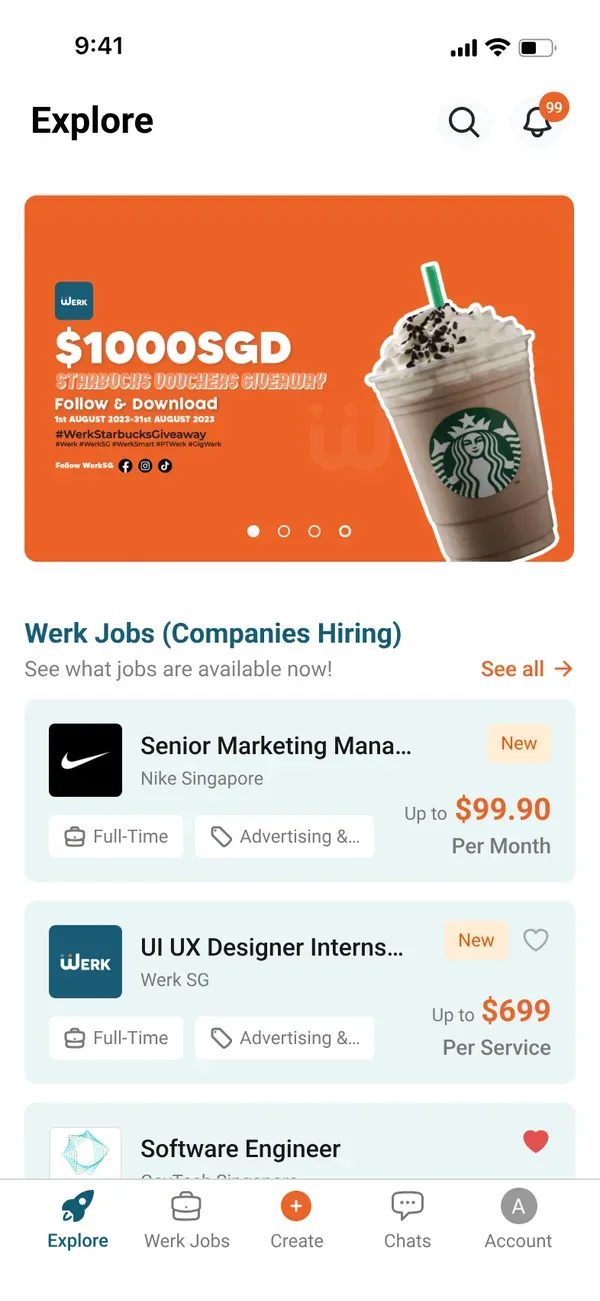
It is a strong fit for MVPs, marketplaces, booking and loyalty apps, internal tools and anything where getting to both stores quickly matters more than squeezing out the last few frames per second. Werk SG, a job marketplace app connecting Singapore job seekers and employers, is a good example of this kind of app.
When native is worth it
Go native when the app’s value depends on the device itself:
- Graphics-heavy experiences such as games, AR or complex animation.
- Deep hardware work: advanced camera processing, Bluetooth devices, health sensors.
- Platform-first features you need on launch day, such as new widgets, watch apps or OS-level integrations.
- An existing native team who will maintain the app long term.
If none of these apply, native usually means paying twice for the same features.
Flutter or React Native?
Both are mature and widely used. In practice the choice comes down to your team and your product:
- Flutter draws its own interface, so designs look identical on both platforms and custom, brand-heavy UI is straightforward.
- React Native uses each platform’s native components and shares a language with web development, which helps if you also have a React website or a JavaScript team.
We pick the framework per project, based on your design, integrations and who will maintain the app after launch.
“Choose native for a reason, not by default. Most apps need to be in both stores more than they need the last frame of performance.”
The Pineapple · app development team
A quick way to decide
- List the five features that matter on day one. If none of them push the device hard, start cross-platform.
- Check your users. If they are on both iOS and Android, one codebase gets you to both stores together.
- Think two years out. Who will maintain the app? One codebase is easier for a small team to keep healthy.
- Prototype the riskiest screen first. If it feels right in a cross-platform prototype, the rest will too.
Quick answers
The questions we hear most on this topic are answered in the FAQ below.

Written by
The Pineapple teamAn app development and web design studio in Singapore. Since 2021 we have launched 60+ apps, platforms and websites for events, education, retail and growing businesses, and we write about what we learn along the way.